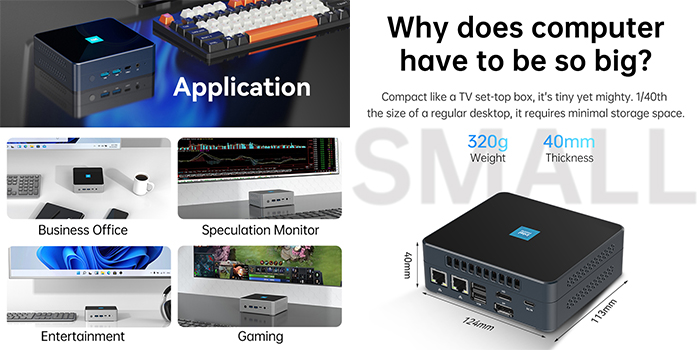
This article serves as a comprehensive guide for selecting and recommending mini computer. My consumption philosophy is rooted in the principle of not creating unnecessary demand and avoiding consumerism.
Currently, the market offers an overwhelming variety of mini desktop pc models and styles, which can complicate the decision-making process when purchasing a mini PC.
Below are some critical factors and recommendations to assist you in choosing the right product while avoiding potential pitfalls.
1. Clarify Requirements
When purchasing a mini PC, the first consideration should be your personal needs. Different use cases require varying hardware configurations. For light office tasks such as web browsing and document editing, an entry-level configuration is sufficient.
However, for more demanding tasks like graphic design, video editing, or gaming, a high-performance mini console with a robust CPU and GPU is necessary.
2. Performance Considerations
The processor's performance is a pivotal factor in determining the overall capability of a mini desktop. Key specifications such as the number of cores, clock speed, cache size, and multi-threading support significantly influence system performance.
Processors with 4 or 6 cores, such as Intel Core i5 or AMD Ryzen 5 series, are suitable for basic home office tasks. For multitasking or running resource-intensive software, multi-threaded processors like Intel Core i7 or AMD Ryzen 7 series are recommended.
The choice between Intel and AMD depends on specific user requirements: Intel processors excel in single-core performance and compatibility with certain applications, while AMD processors offer superior multi-threading capabilities and energy efficiency, making them ideal for graphic designers, video editors, and gamers.
Memory and hard disk capacity also play a crucial role in system responsiveness. Generally, 8GB of RAM suffices for daily use, whereas 16GB or higher is recommended for professional work and gaming. For users requiring extensive data storage, selecting a mini PC with ample storage space is essential.
3. Thermal Management and Noise Control
Given the compact design of mini consoles, effective thermal management is critical to ensuring stable performance. Poor heat dissipation can lead to overheating during intensive tasks, negatively impacting performance. Efficient cooling systems not only enhance thermal performance but also reduce noise levels and extend the lifespan of the device. Modern technologies such as solid-state active cooling, MSP (silent cooling), and VC vapor chambers have been developed to address these challenges. These innovations ensure that mini PCs maintain optimal temperatures even under heavy loads.
4. Interface Options and Practicality
Rich interface options enhance the scalability and usability of mini PCs. Key interfaces to consider include HDMI for connecting TVs and audio systems, DisplayPort (DP) for monitors and projectors, and USB4 for high-speed data transfer (up to 40Gbps). USB4 also supports video output, enabling seamless connections to external portable monitors, dedicated graphics card docks, or SSD enclosures.
Combining these interfaces allows for multi-screen setups, improving productivity and enhancing user experience.
5. Structural Design and Aesthetics
A well-designed structure ensures proper airflow and provides adequate space for heat dissipation, preventing internal components from becoming overcrowded.
This design also facilitates easier upgrades to memory, solid-state drives, and wireless network cards. For users who frequently transport their devices, durability is paramount.
Materials such as aluminum and magnesium alloys offer superior strength and protection compared to standard plastics.
Additionally, aesthetically pleasing designs, such as the recently launched Panray HO4 mini PC with its aluminum alloy frame and RGB lighting, can seamlessly integrate into various environments, including home entertainment rooms, creative studios, and office settings.
6. Brand Reputation and After-Sales Service
Reputable brands often categorize their products into series based on design, performance, functionality, and usage scenarios to cater to diverse consumer needs.
Purchasing from a well-known brand typically ensures better quality assurance and after-sales support. It is advisable to evaluate the manufacturer's warranty policies and customer service before making a purchase to ensure timely resolution of any issues.
In conclusion, selecting a mini PC requires careful consideration of multiple factors to ensure it meets your specific requirements and delivers stable, reliable performance. This guide aims to provide valuable insights to assist you in finding the ideal mini PC for your needs.