I. Why do we recommend a small mini computer?
When using a small host, the first demand is of course for a simple desktop. Hanging the small host behind the screen, the feeling of having nothing on the desktop is really great!
Of course, every time a Mini PC/Mini Desktop Computer is mentioned, there will be some objections, just like against NAS mini pc, such as:
- Why not use a laptop? More cost-effective!
- The performance of the small host is weak, and the PC configuration has taken off long ago at the same price!
- False demand, the screen still needs to be used, and the desktop is not much tidy!
For these objections, my opinion is that you are right! Because these are real problems when using a mini computer.
So why do we still recommend using a small host? Or who is suitable for using a mini host?
1. The Need for Simple Office
In the office scene, workers often pursue table matching and pleasing to the eye, trying to make a neat and clean desktop range to help us reduce the pressure of office work.
In addition to green plants, mini scenes, table signs, cups, shelves and other items, it is a good choice to replace traditional hosts with small hosts to optimize the working atmosphere, especially the compact mini computers that can be hung, which can be hung on the back of the monitor through VESA to achieve a "zero-cable desktop".
In addition, for users who have multiple screens and different display needs, compared with the need to draw multiple cables from the traditional host or the expansion dock to make the desktop messy, the output interfaces such as DP, HDMI, and full-function Type-C on the mini pc, combined with the desktop shelf expansion dock, can better meet the needs of simplicity + practicality.
2. The Needs of Expanding Scenarios.
HTPC:
The core graphics of mainstream desktop mini pc are very powerful. Whether it is the server-side hard decoding to provide Internet services, or providing resources for the TV to perform hard decoding, Blu-ray, 4K, and Dolby are not a problem. Put it on the TV cabinet and play videos through HDMI/TVOS. The main feature is quiet and beautiful.
Productivity:
In some scenarios where you need to purchase servers and productivity, purchasing an independent small computer and using it as a sandbox and virtualization service is a good choice.
- Multi-device collaboration scenario: Thunderbolt 4 interface supports external graphics card dock and high-speed storage.
- Diskless office: Mount NAS storage through iSCSI protocol to achieve system and data separation.
- Soft routing service: Dual network port model, equipped with soft routing, replaces enterprise-level router.
- Development and testing service: SSD solid state, faster reading, writing and compiling.
II. Recommendations for Purchasing Compact Mini PC
1. Processor model
Among the current small host processors, AMD is mainly concentrated in R5/R7; while Intel is mainly concentrated in i5/i7 12, 13 band products, as well as Ultra5, 7; Mac is the current M4.
Among the three processors, Intel is more suitable for lightweight office, and the advantages of large and small cores for multitasking are more obvious; AMD has stronger cost performance and core display capabilities, suitable for users with graphics game needs; Mac is unique in ecology.
- Intel camp (performance increases in sequence): N100/N150; i3-N305; i5-12450H; Ultra 5 125H; i7-13620H
- AMD camp (performance increases in sequence): R7-5825U; R7-7840HS; R7-8845HS (more AI capabilities than 7840)
- Mac camp: M4
2. Data interface
Since the channels provided by a CPU are fixed, but the various data interfaces only change in quantity and form, our choice is the more quantity and the richer the function, the better.
- Oculink: external graphics card.
- Type-C: full function first, PD 3.1 charging performance is excellent. In terms of position, both front and back > rear > front.
- Screen output: dual screens are essential, HDMI 2.1 + DP 1.4 > dual HDMI 2.1; three screens are better (depending on personal needs), plus full-featured USB 4.0 / Type-C.
- Data interface: Thunderbolt 4 > USB 4.0 > USB 3.2 Gen 2 > USB 3.2 Gen 1 > USB 3.0 > USB 2.0.
- Network port: 10Gbps > Dual 2.5Gbps > Dual 1Gbps. (Of course, the network port depends on the needs, and gigabit is enough for actual office use)
- Built-in power supply: It is better to have a built-in power supply, and the desk is more refreshing.
III. Heat Dissipation and Noise
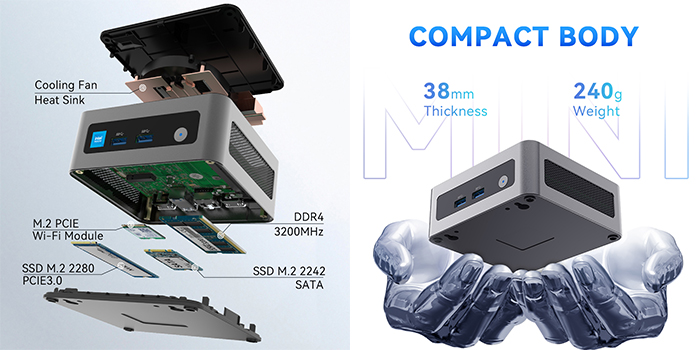
Due to the size limitation, the heat dissipation of small pc is often not as strong as that of PC computers. Therefore, in order to make the mini computer work better, the cooling system is a very important choice for the purchase of the compact desktop pc. The heat dissipation capacity often affects the fan operation of the mini pc, thereby affecting the noise of the desktop mini computer.
- Sufficient heat dissipation material/heat dissipation hole
- Excellent air duct design
- Dual heat pipe/heat plate design
- Intelligent fan control
- Hard disk space (additional heat sink)